Daily Report: FSI Deutsch App First Run · Environment Setup & Debugging — Mar 22, 2026
Why I Wanted to Build This App
While researching German learning methods recently, I came across the FSI (Foreign Service Institute) language course system. The FSI is a training institution under the U.S. Department of State, originally designed to provide intensive language training for diplomats. Its courses cover dozens of languages and are known for being rigorous and systematic. One of the core training techniques in the FSI German curriculum is Substitution Drills — you take a fixed sentence frame and repeatedly swap out vocabulary or grammatical components, drilling through massive repetition until the correct forms become second nature.
This approach fits my current needs perfectly: I have a decent grasp of German grammar, but when it comes to speaking, I still hesitate and make mistakes. I couldn’t find a good app on the market for this kind of drill, so I decided to build one myself — FSI Deutsch, a Flutter iOS app focused on German substitution drills, to systematically improve my spoken output.
What I Did Today
1. Project Setup
- Created the Flutter project skeleton via
flutter create - Imported pre-written source code (
lib/,pubspec.yaml,analysis_options.yaml) and drill data (5 JSON files, A1–C1, totaling 1,692 exercises) - Ran
flutter pub getto install 69 dependency packages - Ran
pod installto install iOS native dependencies
2. Quick Start Guide Rewrite
Rewrote the existing quick start guide from scratch:
- Introduced a
$SOURCEvariable convention for clear path configuration - Switched all commands to absolute paths to avoid
cdmishaps - Added verification steps and a troubleshooting table
- Included a complete copy-paste-ready command block
3. Debugging
Bug #1: CardTheme API Rename
Symptom: Build failure — Xcode reported Could not build the application for the simulator.
Cause: In newer versions of Flutter, CardTheme was renamed to CardThemeData, but the theme.dart copied from the source directory still used the old API.
Fix: Replaced two occurrences of CardTheme( with CardThemeData( in lib/config/theme.dart, and synced the change back to the source directory.
Bug #2: Vocab Hints Showing Wrong Content
Symptom: The “Vocab Hint” card in the drill UI was displaying prompt_zh (Chinese prompt) instead of template (the German vocabulary list).
Investigation:
_buildVocabCard→ readsitem.template— logic correct ✓DrillItemmodel JSON parsing → field mapping correct ✓DatabaseHelperdatabase read → column mapping correct ✓loadSeedData→ found the issue: if existing data is detected, it returns immediately without updating
Root Cause: The simulator still had an old database (version 1) where the template field contained stale data. loadSeedData saw existing records and skipped the import, so the new data never made it in.
Fix:
constants.dart: bumpeddbVersionfrom1→2database_helper.dart: added anonUpgradecallback that drops all old tables and rebuilds- Full app restart (not hot reload) — the database auto-upgraded and reloaded JSON data
Screenshot
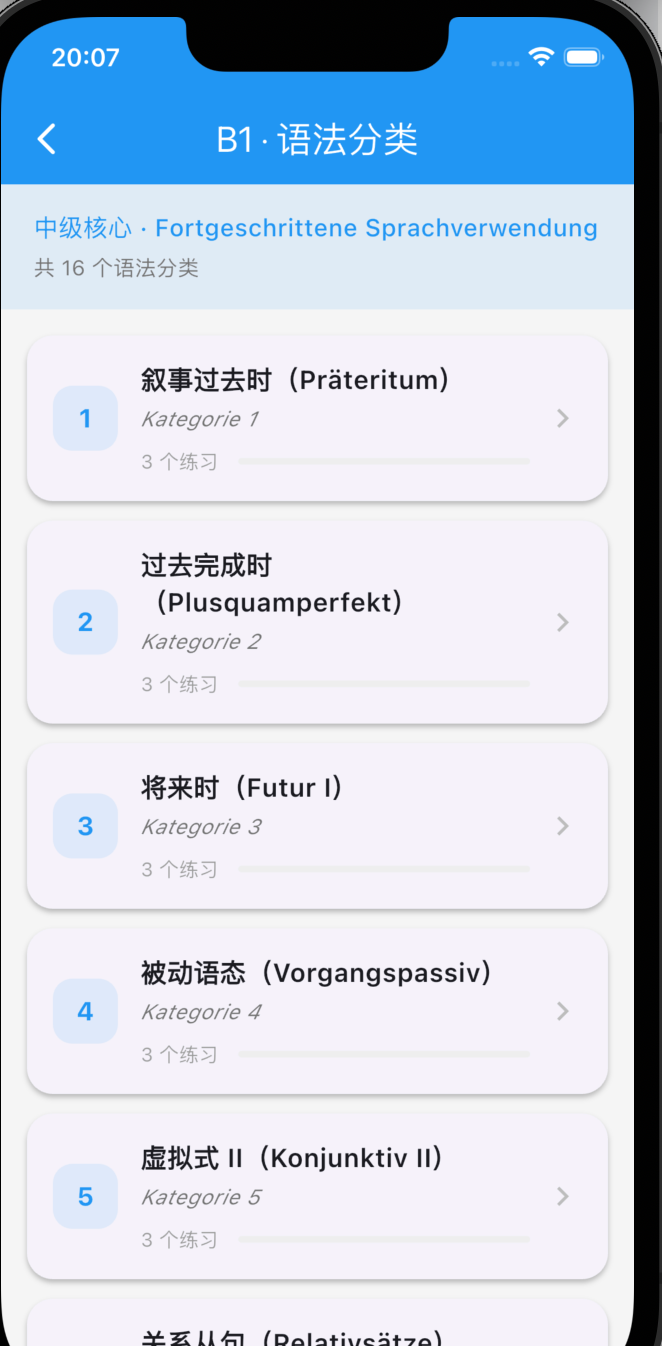
The app running successfully on the iOS simulator — B1 grammar category page:
Current Status
- ✅ App running successfully on the iOS simulator
- ✅ Vocab hints now correctly display template content
- ✅ Quick start guide fully updated
- ✅ Source directory and dev directory in sync
Next Steps
- On-device testing (iPhone deployment + code signing)
- Feature walkthrough: drill flows across all levels, progress tracking, answer feedback
- Continue fixing layout and content/vocab hint display issues