Daily Report: KitaApp Local Verification · Absence Management Up and Running — Mar 25, 2026
What I Did Today
The KitaApp codebase finally came together as a working whole. Today I walked through all seven core MVP features on the local simulator, confirming that every pipeline runs end to end:
| Feature | Verification Steps | Result |
|---|---|---|
| Login Flow | Register → receive verification email → log in → auto-redirect to tabs | ✅ |
| Invite Code | Admin generates code → new user enters it → joins the correct group | ✅ |
| Announcements | Teacher publishes → appears in real time on parent’s device → tap “Ja” → stats update | ✅ |
| Media Upload | Select photos → compress → upload → appears in gallery → long-press shows no context menu | ✅ |
| Absence Management | Parent submits → teacher reviews → marks as read → status updates | ✅ |
| Permission Guard | Parent navigates to /create route → publish button is hidden | ✅ |
| Token Persistence | Log in → kill process → reopen app → session auto-restored | ✅ |
Seven green lights across the board — the local MVP is functionally complete.
Absence Management — The Screen I’m Most Proud Of
Out of all the features, Absence Management (Abwesenheit) is the one I feel best demonstrates the product’s value. In a kindergarten setting, absence requests are among the most frequent parent-teacher interactions: a child falls ill, a family goes on vacation, a dentist appointment comes up — it happens every day. The traditional approach? Drop a message in the group chat, then the teacher manually logs it in a spreadsheet. Messages get buried, and tracking is entirely manual.
KitaApp turns this into a structured workflow. Parents submit an absence request within the app — date, type (full-day or half-day), and reason. Teachers receive it and confirm with a single tap. The screenshot shows three real test entries:
- Lukas Weber — April 1, full day, family vacation, status “Ausstehend” (pending) — the teacher hasn’t confirmed yet
- Emma Weber — March 25, half day, dentist appointment, status “Bestätigt” (confirmed)
- Lukas Weber — March 24, full day, illness, status “Bestätigt” (confirmed)
Each absence card uses color to indicate status: orange for pending, green for confirmed. The four tabs at the bottom (Neuigkeiten / Fotos / Abwesenheit / Profil) form the app’s main navigation.
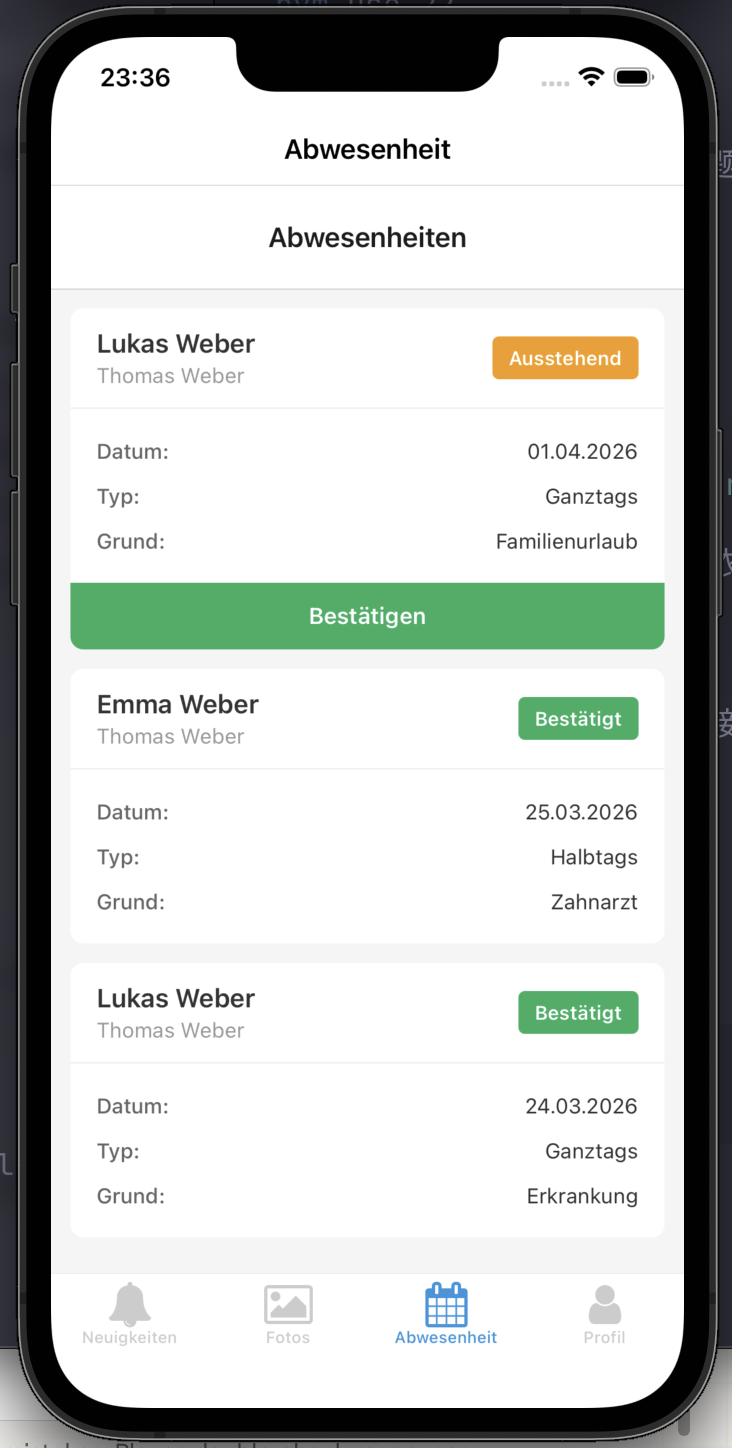
The interface looks simple, but the design decisions behind it took real thought: the card-based layout makes information scannable at a glance, the status badge sits in the top-right corner — the most prominent position, and the action button (Bestätigen) only appears on pending entries. Balancing information density with operational efficiency is what I cared about most in this iteration of the UI.
Next Up: The Deep End of Encryption
Getting the features working is only step one. KitaApp targets German kindergartens, where DSGVO (the EU General Data Protection Regulation) compliance is non-negotiable. Children’s names, photos, and attendance records are highly sensitive personal data — end-to-end encryption is a must. The server should only ever store ciphertext, and even I, as the developer, should not be able to decrypt it.
This raises several technical challenges I’m currently researching:
Challenge 1: The Encryption–Query Paradox
Encrypted data can’t be queried with standard SQL. You can’t write WHERE child_name LIKE '%Max%' when all the server sees is ciphertext. I’m evaluating three approaches:
- Local indexing: Build a search index on the client side. Downsides: slow initial sync, and multi-device consistency is hard to guarantee
- Searchable Symmetric Encryption (SSE): Enables queries over ciphertext, but leakage profiles remain an active area of academic research — production-grade security is still unproven
- Hybrid approach: Keep non-sensitive fields (child_id, dates) in plaintext for querying; encrypt sensitive fields (names, medical info) and decrypt client-side — this is most likely the MVP-stage solution
Challenge 2: Group Key Management
A kindergarten is a dynamic group: teachers leave, parents change every year. Every membership change requires a group key update. The MLS protocol (Messaging Layer Security) theoretically solves this, but current open-source implementations (e.g., OpenMLS) are still in early stages. The impact of frequent key rotation (epoch rotation) on mobile performance and battery life needs real-world testing.
Challenge 3: Bulk Media Encryption Performance
After a school event, a teacher might upload 20–30 photos at once. Encrypting each photo locally before upload could stretch the total time from a few seconds to tens of seconds — and low-end Android devices make this even worse.
Phased Roadmap
| Phase | Timeline | Core Objective |
|---|---|---|
| MVP | 3–4 months | PocketBase + Docker single-kindergarten deployment, AES-256 field-level encryption + PBKDF2 key derivation |
| Productization | 4–6 months | Terraform automated deployment, multi-kindergarten admin panel, Shamir secret sharing |
| Security Hardening | 6–12 months | MLS protocol replacing simple group encryption, searchable encryption, TÜV certification prep |
Current Status
- ✅ All seven core MVP features verified locally
- ✅ Absence management UI and workflow performing as expected
- ⬜ Deploy to server and verify remote pipeline
- ⬜ End-to-end encryption proof of concept